Raleigh Office
Locations: Shadowman 10N220, Risk 14W102, UNO 14332, Spoons (14S210), Risk 15W102, Shadowman 15S330
Go-live: January 2026
How to book: Google Calendar
Red Hat's workplace pilots are intended as a test case for new products, technologies, spaces, and experiences. The pilot program provides us an opportunity to evaluate these innovations, following our Tried Tested Trusted model.
Honor Red Hat's commitment to associate and partner feedback through an open decision framework
Give end users the opportunity to experience new concepts and gain associate buy-in
Test new products and technologies while maintaining internal stakeholder alignment
Red Hat's workplace solutions provide specific technology, space type, or other deployment to address a specific office location's needs. While a solution might become a standard in the future, they are intended to address a need in-the-moment.
Locations: Shadowman 10N220, Risk 14W102, UNO 14332, Spoons (14S210), Risk 15W102, Shadowman 15S330
Go-live: January 2026
How to book: Google Calendar
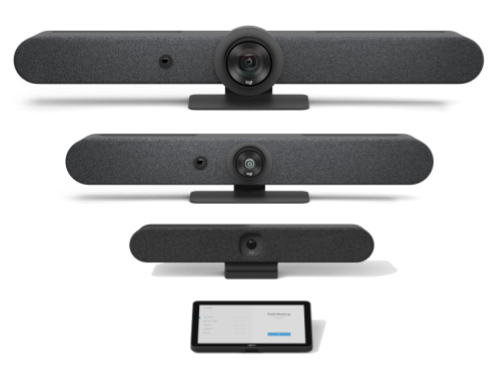
Scalable All-in-One Video Bars: A suite of professional-grade soundbars tailored to room size—from compact huddle spaces to large boardrooms—ensuring consistent 4K video and audio quality across the entire office.
AI-Driven "Front-Row" Experience: Features built-in AI (RightSight & RightSound) that automatically frames participants and levels voices, ensuring remote attendees feel like they are "at the table" rather than just observing it.
Flexible Deployment Modes: Supports "Appliance Mode" to run meetings directly from the room's touch panel (no PC required) or "BYOM Mode" for a simple plug-and-play experience using your own laptop.
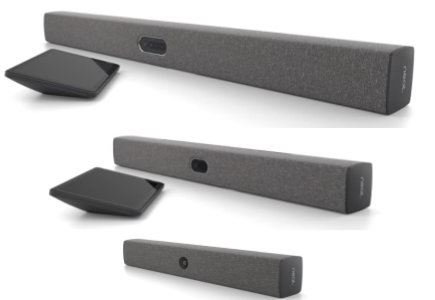
Intelligent "Neat Symmetry" Framing: Uses advanced AI to identify individual participants in the room and frame them into equal-sized boxes on the screen, ensuring remote viewers have a "front-row seat" to every face and gesture.
Precision "Neat Boundary" Control: Perfect for glass-walled rooms and open-concept spaces; it allows us to set digital "fences" so the camera ignores passersby and only focuses on the people actually participating in the meeting.
Native Google Meet & BYOD Versatility: Designed to run Google Meet natively for a "one-tap" join experience from the touch panel, while providing a single-cable USB-C connection to instantly turn the room's high-end gear into a peripheral for any other app on your laptop.
Do you have an idea? We'd love to hear it — please submit the Work Your Way feedback form and we'll be in touch.
Please note that the turnaround time for help requests for this pilot space may be longer than standard spaces. Please ensure you have an alternate work area in case of technical difficulties.
Have a suggestion or comment about Work Your Way?

We’re the world’s leading provider of enterprise open source solutions—including Linux, cloud, container, and Kubernetes. We deliver hardened solutions that make it easier for enterprises to work across platforms and environments, from the core datacenter to the network edge.