Does your room tablet look different?
Google is rolling out a new look for our meeting spaces. If the interface on your controller doesn't match the images shown below, the room has been updated!
Joining a Google Meet call with a meeting code
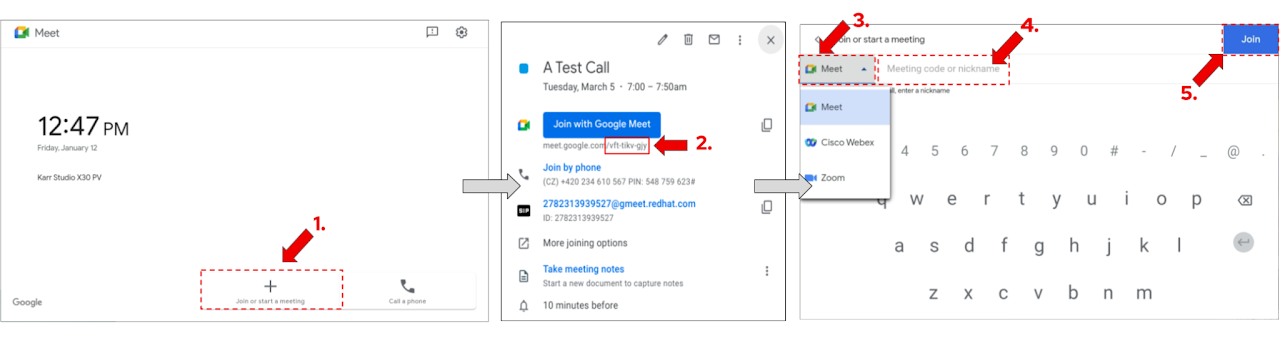
- On the meeting room tablet tap on Join or start a meeting.
- Locate the 10-letter meeting code of your call in the calendar event.
- Make sure Meet is selected in the platform dropdown menu.
- Enter the 10-letter code (the dashes between the letter groups are not required).
- Example of a code: zmz-xook-zhu
- Tap the blue Join button.
Joining a Google Meet call with One Touch Join
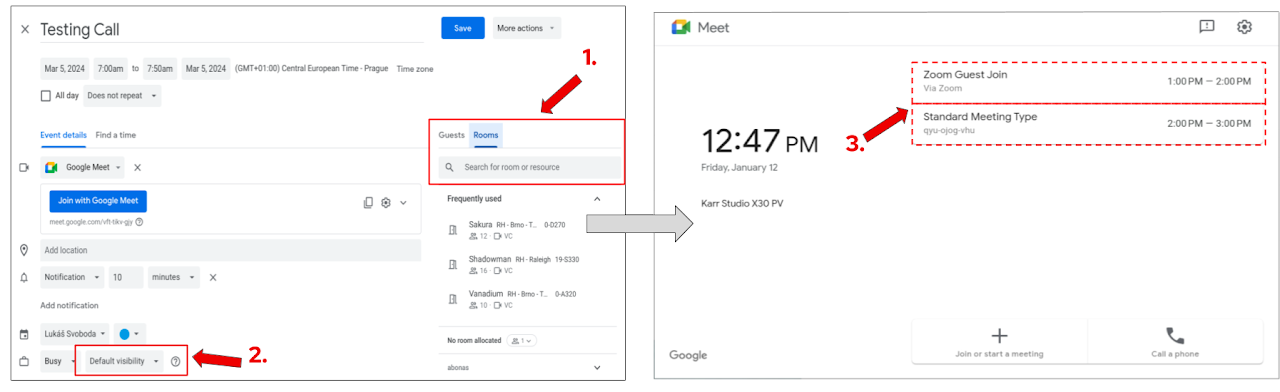
One Touch Join feature allows you to join the call without the need to manually enter the meeting code details. To set it up follow the steps below:
- During event creation, ensure that you add a room resource to the event from which you are planning to join the call.
- During event creation, ensure that your event is not set to be private.
- If an event is private, the system won’t be able to read the event’s details and the One Touch Join functionality won’t be available.
- Once it is time for your call, on the in-room tablet tap on your scheduled call in the right hand top corner of the screen.
Important note: One Touch Join is available only in bookable meeting rooms!
Content Sharing | On a call (Google Meet)
Content sharing to a Google Meet call is available via Google Companion mode, but also directly via cable connection, see all options below.
Option 1. - Companion Mode (Method A)
- On your laptop's web browser visit g.co/companion.
- Select the relevant meeting from the list to join via Companion mode.
- This will join the call with your microphone and audio muted to prevent audio feedback and other distractions.
- Utilize the present button to select what content you want to present.
Option 2. - Companion Mode (Method B)
- Join the call from your laptop as usual.
- In the call lobby, choose the Present button if you want to present immediatelly or Use Companion mode instead to join the call and be ready to present when needed.
- Joining via Companion mode will automatically mute your microphone and audio to prevent audio feedback and other distractions.
- Utilize the present button to select what content you want to present.
Option 3. - Via Cable (Not available in all rooms - pending roll-out)
- Launch a Google Meet call from the meeting room tablet
- Connect the USB-C/HDMI cable to your laptop
- Tap on Present to the meeting button in the right side menu.
- Select Present
- Presentation audio can be turned OFF by unchecking the relevant checkbox
- You can stop presenting at any time via the meeting room tablet or by unplugging the cable
Local Content Sharing | Outside of a call
You can currently choose from two options when it comes to locally sharing content, see below.
Via Device Mode
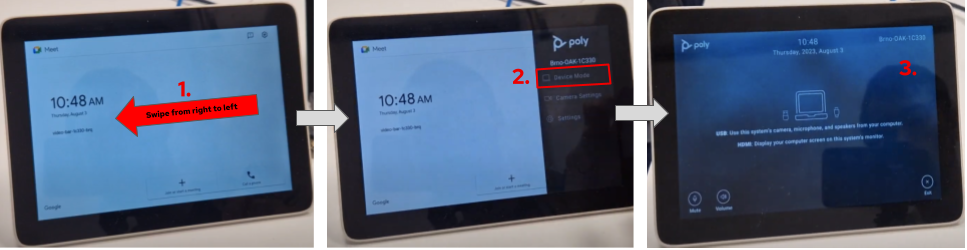
- On the meeting room tablet, swipe from right to left. Side menu will appear.
- In the side menu, select Device Mode.
- Now you can plug the HDMI/USB-C cable available on the table into your laptop to present.
- If sharing audio: Make sure your laptop's audio output is set to the room system.
Important notes:
- Large meeting spaces such as Plutonium do not have this option available.
- In meeting rooms with dual displays the content being shared will be present only on one of the displays when done via Device Mode. We are working with Google to extend the functionality in the future to support mirroring capability.
Via USB-C Directly (Not available in all rooms)
- Tap on the Present to room button.
- In some rooms this button will not be functional - pending rollout.
- Connect the USB-C cable to your laptop
- If sharing audio: Make sure your laptop's audio output is set to the room system.
Joining a Webex or a Zoom meeting
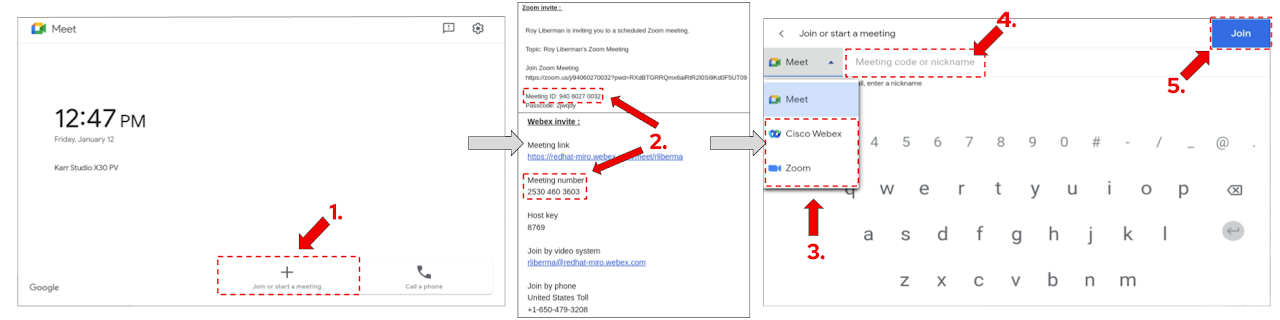
- On the meeting room tablet tap on Join or start a meeting.
- Locate the Cisco Webex or Zoom meeting code of your call in the calendar event.
- Depending on the platform you want to use, select Cisco Webex or Zoom in the platform dropdown menu.
- Enter the Cisco Webex meeting number or Zoom meeting ID.
- Tap the blue Join button.
- Wait until you are admitted to the call.
Important notes:
- Cisco Webex and Zoom are not Red Hat IT supported video platforms.
- In order to share a content you will need to use Webex's and Zoom's web or OS application (or Google Meet Companion mode equivalent).
Bring Your Own Meeting (BYOM) | For platforms like Microsoft Teams and others
Bring Your Own Meeting (BYOM) feature enables you to join meetings on Microsoft Teams and various other platforms beyond our standard options like Google Meet, as you can utilize the in-room video conferencing equipment (microphone, speakers, camera and screen) via the USB-C cable to enhance your experience and launch the platform of your choice from your laptop.
To leverage this feature, follow the steps below:
- On the meeting room tablet, swipe from right to left. Side menu will appear.
- In the side menu, select Device Mode.
- Now you can plug in the USB-C cable (for microphone, speakers, camera and screen connection).
- On your laptop, launch video application of your choice.
- In your video application settings ensure you choose the room's Speaker, Microphone and Camera.
- The exact naming of the equipment to choose will depend on your operating system, but it should always include one of the options below:
- X30; X32; X50; X52; X70; X72
- The exact naming of the equipment to choose will depend on your operating system, but it should always include one of the options below:
- Join the call.
Notes:
- In case you are connecting via BYOM for the first time, we recommend coming to the room early and making sure everything is set up correctly.
- For more customization, in your laptop settings you can also change the display settings to extend/join based on your requirements.
- Zoom and Cisco Webex can be used with BYOM as well. For these platforms it might come to a personal preference and therefore we recommend trying both approaches and choosing what works best for you.
- The BYOM feature can be also leveraged beyond just calls, e.g. playing audio/video content.
For more information about video conferencing service at Red Hat visit The Source (Internal only).
Have a suggestion or comment about Work Your Way?

Products
- Red Hat Enterprise Linux
- Red Hat OpenShift
- Red Hat Ansible Automation Platform
- Cloud services
- See all products
Tools
- My account
- Training and certification
- Customer support
- Developer resources
- Learning community
- Partner resources
- Resource library
Try, buy & sell
- Product trial center
- Red Hat Marketplace
- Red Hat Ecosystem Catalog
- Find a partner
- Red Hat Store
- Console
Communicate
About Red Hat
We’re the world’s leading provider of enterprise open source solutions—including Linux, cloud, container, and Kubernetes. We deliver hardened solutions that make it easier for enterprises to work across platforms and environments, from the core datacenter to the network edge.
Subscribe to our newsletter, Red Hat Shares
Red Hat legal and privacy links
- About Red Hat
- Jobs
- Events
- Locations
- Contact Red Hat
- Red Hat Blog
- Diversity, equity, and inclusion
- Cool Stuff Store
- Red Hat Summit